Grades and official EPST report cards
Each class receives the grid of its official report card: subjects, order, period and exam maxima, subtotals. Grades validated by management fill the report card throughout the year; it only remains to print it.
- Teacher
- Management
- Secretariat (backup entry)
What the module does
- National report card library: over a hundred models (primary, CTEB, secondary options), versioned when a circular changes them.
- Entry designed for the phone: one field per pupil, numeric keypad; direct entry or through assessments (tests, homework…).
- Offline, grades stay on the phone and are sent automatically when the network comes back.
- Excel grade sheet to fill in at home, then re-imported with a preview of errors before saving.
- Validation by management: a validated sheet is locked; a later correction requires a reason.
- Report card PDF for one pupil or the whole class, ranking list, list of decisions, effort and conduct.
- Subject maxima and order set for a whole level; report card wording set per section (ministry, place, stamp).
- Closing of a period, a term or a semester; “results available” message to parents.


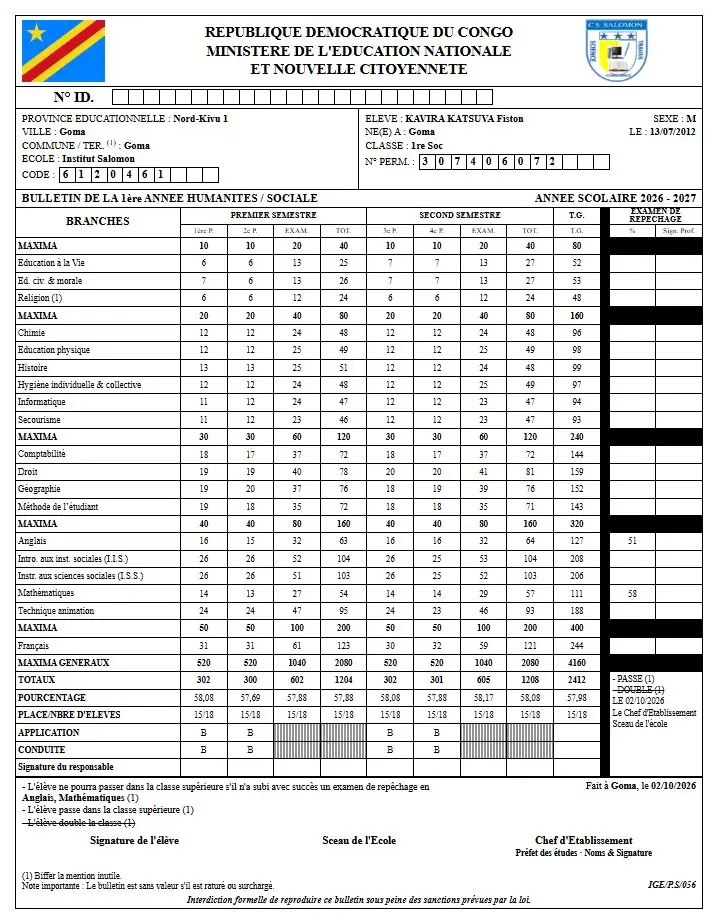
Screenshots taken on the manual's demonstration school (fictitious data). The interface is in French.
In the manual (Manual in French)
The manual describes every screen step by step, with screenshots on computer and on phone.
A question about this module?
Message Genius ICT on WhatsApp: your message is already written, you only have to send it.
Message us on WhatsAppSee Masomo Mepesi with the data of a real school.
Open the demonstration with the account of your choice (owner, cash desk, teacher, parent…), or message us: Genius ICT comes to present Masomo at your school.